What is Windsurf?
Windsurf is an AI-first code editor built on a fork of VS Code. If that sounds familiar, it should. It's the same approach Cursor took, but Windsurf (originally launched as Codeium) has carved out its own lane by focusing on speed, a generous free tier, and an agent-style AI called Cascade.
The rebrand from Codeium to Windsurf happened in late 2024, and it confused some people. But the product underneath kept improving. If you tried Codeium a year ago and weren't impressed, Windsurf today is a different story.
Key Features
Cascade (Agentic AI)
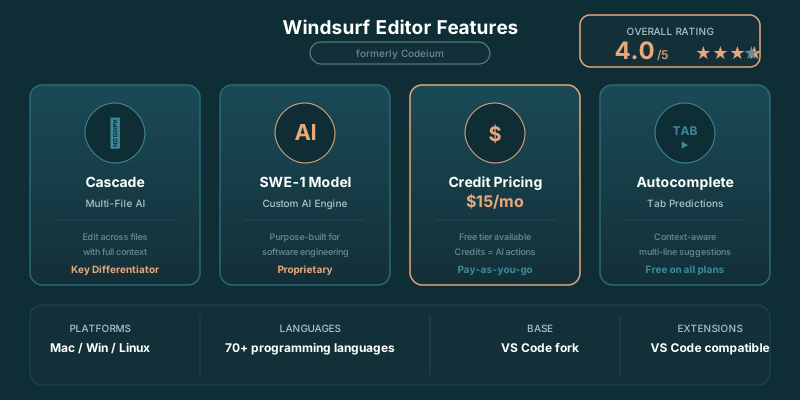
Cascade is Windsurf's answer to Cursor's Composer. It's an AI agent that can read your codebase, plan multi-step changes, and execute them across files. You describe what you want in plain language, and Cascade builds a step-by-step plan before making changes.
For prompt engineers working on LangChain applications or complex API integrations, Cascade is a solid partner. It won't always match Cursor's Composer for the most intricate refactoring jobs, but for 80% of multi-file tasks, it gets there.
Supercomplete (Autocomplete)
Windsurf's autocomplete is fast. Noticeably fast. It uses a custom model optimized for code completion, which means suggestions appear almost instantly. There's none of the lag you sometimes get with cloud-based completions.
The predictions are context-aware and span multiple lines. It can anticipate not just the next line but the next several lines of code, especially in repetitive patterns like API route definitions or test cases.
Flows (Contextual Chat)
Flows is Windsurf's chat interface, and it maintains context across your conversation. Ask about a function, then follow up about its tests, and Flows remembers what you were discussing. It's aware of your full codebase, open files, and recent edits.
Terminal Integration
Windsurf includes AI-powered terminal commands. You can describe what you want to do in natural language, and it generates the shell command. This is particularly useful for developers who can never remember the right flags for ffmpeg or docker compose.
What Changed in April 2026
Credit-Based Pricing
Windsurf moved to a credit system in early 2026, replacing the old unlimited-use Pro subscription. The free tier now gives 25 credits per month. Pro at $15/month gives 500 credits. Every Chat, Cascade, and Command interaction costs credits, with the exact amount depending on the model and conversation length. Tab completions remain unlimited and free on all plans. Add-on credits are available at $10 for 250 credits if you run out mid-month.
SWE-1 Model
Windsurf introduced its own SWE-1 model, purpose-built for software engineering tasks. SWE-1 costs a fixed number of credits per interaction regardless of conversation length, making credit consumption more predictable than third-party models like Claude Sonnet 4.6, which charge based on token volume. For routine coding tasks, SWE-1 is a good balance of quality and credit efficiency. For complex reasoning or architectural decisions, switching to Claude Sonnet 4.6 or GPT-4.1 through Windsurf is worth the higher credit cost.
Cascade Improvements
Cascade has improved significantly since its initial launch. The multi-step planning is more reliable, context preservation across steps is better, and it handles larger codebases without losing track of the task. The gap between Cascade and Cursor's Composer has narrowed, though Composer still handles the most complex cross-repository refactoring more cleanly. For typical feature-building workflows (adding a new API endpoint, creating a component with tests, refactoring a module), Cascade gets the job done at a lower price point.
Windsurf vs Cursor in April 2026
The competitive landscape has shifted. Both editors now use credit systems, and the per-feature comparison is tighter than it was six months ago. Cursor's advantage is Auto mode (unlimited, does not consume credits) and deeper model selection flexibility. Windsurf's advantage is the lower price ($15 vs $20) and the predictable credit cost of SWE-1. For developers who primarily use AI for autocomplete and occasional multi-file edits, Windsurf delivers 90% of Cursor's capability at 75% of the cost. For developers who run Agent mode sessions all day and need to select premium models per request, Cursor's unlimited Auto mode is the better deal.
Pricing Breakdown
The free tier gives 25 credits per month with unlimited Tab completions. Pro at $15/month gives 500 credits and access to Claude Sonnet 4.6, GPT-4.1, and Gemini through the credit system. Teams at $30/user adds admin controls and SSO. Enterprise at $60/user includes Zero Data Retention and advanced compliance features. See our full Windsurf pricing breakdown.
Windsurf vs Cursor
This is the comparison everyone wants. See our full Cursor vs Windsurf breakdown, but the quick version: Cursor wins on multi-file editing power and model choice. Windsurf wins on price and autocomplete speed. Both moved to credit systems in 2026, making the cost comparison more nuanced than a simple $15 vs $20. Your usage pattern determines which is cheaper.
✓ Pros
- Free tier is the most generous of any AI editor
- Cascade agent mode handles multi-file tasks well
- Fast autocomplete that stays out of your way
- VS Code extensions mostly work out of the box
- Lower price than Cursor at the Pro tier
- Built-in terminal AI commands
✗ Cons
- Cascade can lag behind Cursor's Composer on complex refactors
- Fewer model choices than Cursor (no direct Claude/GPT-4.1 toggle)
- Brand confusion from the Codeium rename
- Some VS Code extensions have compatibility quirks
- Smaller community and fewer tutorials available
Who Should Use Windsurf?
Ideal For:
- Budget-conscious developers who want strong AI features without paying $20/month
- Solo developers and freelancers who need a capable AI pair programmer at a lower cost
- Teams evaluating AI editors where the free tier lets everyone try before buying
- Python and JavaScript developers where Windsurf's autocomplete shines brightest
Maybe Not For:
- Power users who need model flexibility since you can't switch between Claude and GPT-4.1 on demand
- Enterprise teams with strict compliance needs where Copilot's GitHub integration matters more
- Developers deeply invested in JetBrains since Windsurf is VS Code-based only
Our Verdict
Windsurf is the best value proposition in AI code editors right now. Its free tier is generous enough for hobbyists and students, and the $15/month Pro plan undercuts Cursor by $5 while offering comparable features for most workflows.
Where it falls short is at the edges. Cursor's Composer still handles complex multi-file refactoring better, and power users who want to pick between Claude and GPT-4.1 per task won't find that flexibility here. But for the majority of developers who just want solid AI assistance without overthinking it, Windsurf gets the job done at a price that's hard to argue with.