 PE Collective
Cursor Pricing: Every Plan Explained (April 2026)
Cursor overhauled its pricing in mid-2025, replacing fixed request allotments with usage-based credit pools. Every paid plan now includes a monthly credit pool that depletes based on which AI model you use. Auto mode (Cursor's default model routing) is unlimited. Manually selecting premium models like Claude Sonnet 4.6 or GPT-4.1 draws from your pool. This page breaks down every plan, what the credits actually buy, and which tier makes sense for different workflows.
Hobby
- ✓ Limited AI requests per month
- ✓ Basic Tab autocomplete
- ✓ Access to Cursor's default model
- ✓ Good for trying the tool before committing
- ✓ No credit pool, fixed request limits
Pro
- ✓ $20/mo credit pool for premium model requests
- ✓ Unlimited Auto mode (Cursor picks the model)
- ✓ Access to Claude Sonnet 4.6, GPT-4.1, Gemini
- ✓ Composer for multi-file agentic editing
- ✓ MCPs, skills, hooks, and cloud agents
Pro+
- ✓ $60/mo credit pool (3x Pro)
- ✓ Everything in Pro with higher limits
- ✓ Extended limits on Agent mode
- ✓ Ideal for heavy daily AI coding use
- ✓ 20% discount on annual billing
Ultra
- ✓ $200/mo credit pool (20x Pro usage)
- ✓ Priority access to new features
- ✓ Maximum AI throughput available
- ✓ Best for power users and AI-first workflows
- ✓ 20% discount on annual billing
Teams
- ✓ All Pro features per user
- ✓ Centralized billing and admin controls
- ✓ SSO and team management
- ✓ Usage visibility across the team
- ✓ Enterprise tier available (custom pricing)
How the Credit Pool System Works
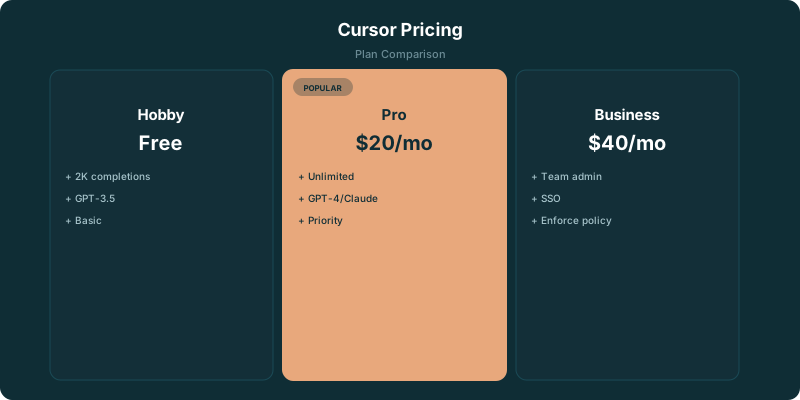
In mid-2025, Cursor replaced its fixed 'fast request' system with usage-based credit pools. Each paid plan includes a monthly credit pool equal to the subscription price in dollars. Pro gets $20, Pro+ gets $60, Ultra gets $200.
When you use Auto mode (Cursor's default), it picks the best model for each task automatically. Auto mode requests are unlimited and don't draw from your credit pool. This is the most important detail in Cursor's pricing, most routine coding tasks work fine with Auto mode.
When you manually select a premium model like Claude Sonnet 4.6, GPT-4.1, or Gemini, each request deducts from your pool based on the actual API cost of that model. Cheaper models like GPT-4.1 Nano use less of your pool per request than expensive models like Claude Opus 4.6.
Your pool resets monthly. Unused credits don't roll over. If you exhaust your pool mid-month, you can still use Auto mode (unlimited) or purchase additional credits. This means Cursor never stops working, you just lose the ability to manually pick premium models.
Pro vs Pro+ vs Ultra: When to Upgrade
The three individual paid tiers differ only in credit pool size and a few perks. All of them include the same features: Composer, Agent mode, Tab autocomplete, Chat, MCPs, skills, hooks, and cloud agents. The question is purely about usage volume.
Pro ($20/mo) works for developers who use AI assistance for a few hours each day. With Auto mode unlimited, you only consume credits when you manually select a model. A developer who does 10-20 manual premium requests per day stays well within the $20 pool.
Pro+ ($60/mo) is for developers who live in Cursor all day and frequently use Composer for multi-file edits or Agent mode for extended sessions. These features consume more credits per use than simple Tab completions or Chat queries. If you find yourself rationing Pro credits in the second half of each month, Pro+ solves that.
Ultra ($200/mo) is for a small group of power users who run Agent mode sessions constantly, use the most expensive models for every task, and treat Cursor as their primary development interface. Most developers never need Ultra, it exists for the ceiling.
Teams vs Individual Pro: The Math
Teams costs $40/user/month, double the price of individual Pro at $20/month. Is it worth it? The answer depends on your team size and operational needs.
What Teams adds over individual Pro subscriptions: centralized billing (one invoice instead of expense reports from each developer), admin controls (manage seats, set policies), SSO integration, and usage visibility across the team. If your company requires SSO or centralized billing, Teams is the only option.
What Teams doesn't add: more AI features. Every developer on Teams gets the same AI capabilities as an individual Pro subscriber. The premium is purely for organizational features.
Enterprise (custom pricing) adds pooled usage across the organization, invoice billing, and dedicated support. Pooled usage is valuable when some team members are heavy users and others are light, the credits balance out across the team instead of being wasted on light users.
Cursor vs Windsurf vs GitHub Copilot: Price Comparison
The three leading AI code editors have different pricing philosophies. Here's how they compare at each tier.
What Models Are Available on Each Plan
All paid Cursor plans give access to the same set of AI models. The difference is how many premium requests your credit pool covers, not which models you can use.
Available models include Claude Sonnet 4.6, Claude Opus 4.6 (highest quality, most expensive per request), GPT-4.1, GPT-4.1 Nano (cheapest per request), and Gemini models. The exact lineup changes as Cursor adds support for new models.
Auto mode uses Cursor's own model routing, selecting the best model for each task automatically. For Tab completions, it typically uses a fast, cheap model. For Composer and complex Chat queries, it routes to a more capable model. Auto mode is unlimited on all paid plans.
The Hobby (free) tier has access to fewer models and no credit pool. You get a fixed number of AI requests per month that don't carry over.
Hidden Costs and Gotchas Nobody Mentions
Cursor's pricing is straightforward on paper, but a few things catch people off guard in practice.
Composer sessions are expensive. A single multi-file Composer edit might consume 5-10x more credits than a Chat question. If you're using Composer for small changes that Tab completion could handle, you're overspending. Save Composer for tasks that span multiple files.
Agent mode burns credits fast. Extended Agent sessions (where Cursor autonomously writes, tests, and iterates) can use a significant chunk of your monthly pool in a single session. Monitor your credit usage during long Agent runs.
Annual billing locks you in. The 20% discount is real, but if your usage pattern changes (seasonal projects, job change, trying a competitor), you're stuck. Monthly billing costs more but gives flexibility.
Cloud agents are a new feature that runs Cursor's AI in the cloud. These sessions consume credits and can be surprisingly expensive for long-running tasks. Check your usage dashboard after your first few cloud agent sessions to calibrate expectations.
Tips to Maximize Your Credit Pool
Use Auto mode as your default. It's unlimited on all paid plans and handles 80% of coding tasks well. Only switch to manual model selection when Auto mode's output quality isn't sufficient for a specific task.
Pick the cheapest adequate model for manual requests. GPT-4.1 Nano costs a fraction of Claude Opus 4.6 per request. For simple code generation or boilerplate, Nano is fine. Save Opus for complex architecture decisions and difficult debugging.
Use Tab completion instead of Chat for simple changes. Tab is cheaper than Chat, and Chat is cheaper than Composer. Match the tool to the complexity of the task.
Review your usage dashboard weekly. Cursor shows your credit consumption by model, feature, and day. This data tells you whether you're on track to exhaust your pool or have room to spare. Adjust your model selection habits accordingly.
Consider annual billing only after 2-3 months of usage data. Don't commit to annual on day one, use monthly first to understand your actual consumption pattern, then switch to annual if Pro is consistently the right tier.
Hidden Costs & Gotchas
- ⚠ The credit pool depletes based on the AI model you choose. Claude Sonnet 4.6 costs more per request than GPT-4.1 Nano. A $20 pool might cover ~225 Sonnet requests or ~550 cheaper model requests.
- ⚠ Auto mode is unlimited but Cursor picks the model. If you manually select a premium model for every request, your pool drains fast.
- ⚠ Annual billing saves 20%, but you're locked in. Monthly gives flexibility to downgrade if your usage drops.
- ⚠ Cloud agents and extended Composer sessions consume credits faster than simple Tab completions. Heavy agentic workflows can burn through a Pro pool in 2 weeks.
- ⚠ Teams plan at $40/user is 2x Pro, but you get admin controls and SSO. If your team doesn't need those, individual Pro subscriptions are cheaper.
Which Plan Do You Need?
Casual coder or student
Hobby (free). The limited AI requests are enough if you're coding a few hours per week. Upgrade to Pro when you hit the wall.
Full-time developer
Pro at $20/mo. The credit pool covers normal daily coding. Use Auto mode (unlimited) for most tasks and save manual model selection for complex problems. Most developers don't exhaust Pro.
AI-heavy developer (daily Composer/Agent use)
Pro+ at $60/mo. If you're running multi-file Composer edits and Agent sessions regularly, Pro's pool runs out by mid-month. Pro+ gives 3x the credits.
Engineering team (3+ devs)
Teams at $40/user. Worth the premium over individual Pro for centralized billing, usage visibility, and SSO. Enterprise (custom) adds pooled usage across the org and dedicated support.
The Bottom Line
Pro at $20/mo is the right starting point for most developers. The credit pool system means you only pay more if you're actively using premium models. Auto mode being unlimited is the key insight, let Cursor pick the model for routine tasks and manually select Claude or GPT-4.1 only when quality matters. If you're burning through credits, Pro+ at $60/mo gives 3x the pool. Ultra at $200/mo is for the small percentage of developers who live in Agent mode all day.
Related Resources
Frequently Asked Questions
How much does Cursor cost?
Hobby is free with limited requests. Pro costs $20/month. Pro+ costs $60/month. Ultra costs $200/month. Teams costs $40/user/month. Enterprise is custom pricing. All paid plans include a credit pool equal to the subscription price.
What's the difference between Auto mode and manual model selection?
Auto mode lets Cursor pick the best model for each task automatically, it's unlimited on all paid plans and doesn't use your credit pool. Manual model selection lets you choose a specific model (like Claude Sonnet 4.6) but each request deducts from your monthly credit pool.
Is Cursor Pro worth $20/month?
For full-time developers, yes. Unlimited Auto mode handles most coding tasks, and the $20 credit pool covers manual premium model requests for typical daily use. If you're coding less than 10 hours/week, the free Hobby tier might be enough.
How does Cursor compare to GitHub Copilot pricing?
Copilot Pro is cheaper at $10/month vs Cursor's $20/month. But Cursor includes Composer (multi-file editing), Agent mode, and model selection that Copilot doesn't match. Copilot Business at $19/user is cheaper than Cursor Teams at $40/user. The tradeoff is features vs cost.
Can I use Cursor for free?
Yes. The Hobby plan is free forever with limited AI requests per month. It includes basic Tab autocomplete and Chat, but no credit pool for premium models. It's enough to evaluate the tool but not for daily professional use.
What happens when I run out of credits?
Auto mode keeps working (it's always unlimited). You lose the ability to manually select premium models until your pool resets next month. You can also purchase additional credits to continue using premium models.
Should I get Pro+ or Ultra?
Start with Pro. If you consistently exhaust your credits before month-end, upgrade to Pro+ ($60/mo). Ultra ($200/mo) is only worth it if Pro+ also runs out, that means you're doing heavy Agent mode or Composer work daily. Most developers are fine on Pro or Pro+.
Does Cursor offer annual billing?
Yes, annual billing gives a 20% discount on all paid plans. Pro drops to $16/month, Pro+ to $48/month, Ultra to $160/month. Only commit to annual after 2-3 months of monthly usage so you know which tier fits.