 PE Collective
GitHub Copilot Pricing: Every Plan Compared (May 2026)
GitHub Copilot now has five tiers, from a useful free plan to Enterprise at $39/user. The pricing revolves around 'premium requests', a currency that powers Chat, Agent mode, code review, and model selection. The free tier's 50 premium requests per month is enough to test but not to rely on. This page breaks down every plan, what premium requests actually buy, and which tier fits different developer workflows.
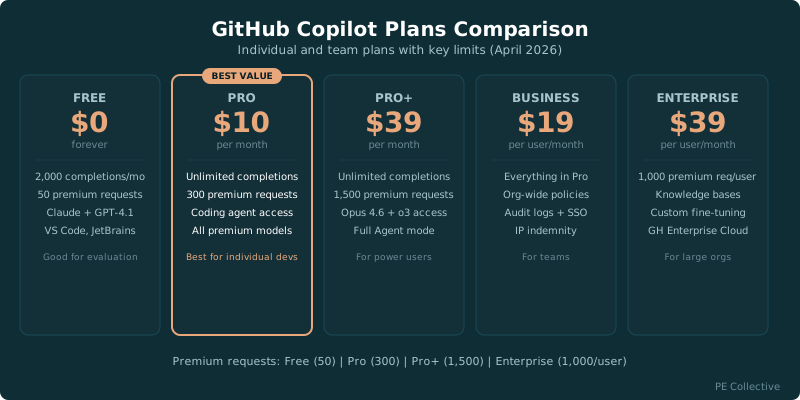
GitHub Copilot Price Per Month at a Glance
Five plans, from free to $39 per user. Here is the price per month and what you get for it, before any premium-request overage. The number that actually controls your bill is premium requests, not the sticker price, so that column is the one to read first.
Overage past your monthly allotment runs $0.04 per premium request on every paid plan. Enterprise carries a hidden line item: it requires GitHub Enterprise Cloud at $21 per user, so the real Enterprise price is $60 per user per month, not $39.
Has the GitHub Copilot Price Changed? Increases and Plan Shifts
The headline numbers have been quiet. Free, Pro, and Pro+ list prices held flat from late 2025 through May 2026 at $0, $10, and $39. Microsoft kept the sticker prices steady and changed what sits behind them instead, which is why a "price increase" can hit your bill even when the plan name and price look identical to last quarter.
Three shifts that change your real cost without touching the list price:
- The premium-request model. In early 2026 GitHub moved Pro from a fixed-completions structure to unlimited completions plus a 300 premium-request cap. If your work leans on Chat and Agent mode, that cap is your new ceiling, and hitting it bills $0.04 per extra request. A developer who runs 200 requests over cap pays $8 on top of the $10 base.
- The Enterprise Cloud prerequisite. Since Q3 2025 the $39 Enterprise tier requires GitHub Enterprise Cloud at $21 per user. That moved real Enterprise cost from $39 to $60 per user per month. The Copilot line did not change. The total did.
- Model access expansion. Pro+ added Claude Opus 4.6 and o3 in early 2026. Those models consume more premium requests per call than GPT-4.1, so leaning on them drains your allotment faster and pushes you into overage sooner. Same price, faster burn.
Where a real increase is most likely in 2026: the Business and Enterprise tiers, tied to new features like custom fine-tuning and advanced security, not the individual plans. If you run a team and the budget allows, locking a multi-year Enterprise contract now hedges against that. The full month-by-month log sits in the Pricing Update Tracker further down this page.
Free
- ✓ 2,000 code completions per month
- ✓ 50 premium requests per month
- ✓ Access to Claude Sonnet 4.6 and GPT-4.1
- ✓ Works in VS Code, JetBrains, Neovim
- ✓ Good for evaluation, not daily use
Pro
- ✓ Unlimited code completions
- ✓ 300 premium requests per month
- ✓ Copilot coding agent access
- ✓ All premium AI models in Chat
- ✓ Best value for individual developers
Pro+
- ✓ 1,500 premium requests per month (5x Pro)
- ✓ Access to ALL models including Claude Opus 4.6 and o3
- ✓ Full Agent mode capabilities
- ✓ Priority access to new features
- ✓ For power users who hit Pro's limits
Business
- ✓ Everything in Pro for each user
- ✓ Organization-wide policy controls
- ✓ Audit logs and IP indemnity
- ✓ SSO (SAML) integration
- ✓ File exclusion controls
Enterprise
- ✓ 1,000 premium requests per user
- ✓ Knowledge bases for codebase context
- ✓ GitHub.com Chat integration
- ✓ Custom model fine-tuning options
- ✓ Requires GitHub Enterprise Cloud
Premium Requests: The Hidden Unit That Controls Your Bill
Premium requests are GitHub Copilot's currency for AI-powered features beyond basic code completion. Chat messages, Agent mode actions, code reviews, and manual model selection all consume premium requests.
The cost per premium request varies by feature and model. A simple Chat question using the default model costs 1 premium request. Selecting a more expensive model like Claude Opus 4.6 may cost more per request. Agent mode sessions consume multiple premium requests as the agent iterates through steps.
Your premium request quota resets on the 1st of each month. Unused requests don't roll over. If you exceed your quota, additional requests cost $0.04 each, billed to your account automatically.
Code completions (Tab autocomplete) are separate from premium requests. Free tier gets 2,000 completions per month. All paid plans get unlimited completions. This distinction matters, the core autocomplete experience works even when your premium requests are exhausted.
How Fast Will You Burn Through the Free Tier?
GitHub Copilot's free tier launched as a way to get developers hooked before they pay. It works. 2,000 code completions per month covers light coding, maybe 1-2 hours of active development per day. 50 premium requests per month is about 2-3 Chat interactions per day.
The free tier includes access to Claude Sonnet 4.6 and GPT-4.1 in Chat. You don't get the full model lineup (no Opus 4.6 or o3), but the available models handle most coding questions well.
The limitation that bites first is usually premium requests, not completions. 50 per month means you have to be intentional about when you use Chat or Agent mode. If you're the type of developer who asks the AI a question every 10 minutes, you'll exhaust 50 requests in a single day.
The free tier works in VS Code, JetBrains, and Neovim. There's no feature lockout on IDE support, the limitation is purely on usage volume.
Pro ($10/Mo) vs Pro+ ($39/Mo): Is 4x the Price Worth It?
Pro at $10/month gives 300 premium requests. Pro+ at $39/month gives 1,500. The 5x increase costs 3.9x the price, so Pro+ is better value per request if you need the volume.
The breakeven math: if you'd use more than ~725 premium requests per month on Pro (paying $0.04 each for the overage), Pro+ saves money. That's about 36 premium requests per working day, heavy but not extreme for a developer who uses Chat frequently.
Pro+ also unlocks access to all available models, including Claude Opus 4.6 and o3. Pro gives access to premium models but not the full lineup. If you specifically need Opus 4.6's reasoning quality for complex architecture questions, Pro+ is the only individual plan that provides it.
Most developers should start with Pro. Track your premium request usage for 2-3 months. If you're consistently hitting 250+ requests before month-end, the upgrade to Pro+ pays for itself.
Copilot vs Cursor vs Windsurf: Which Saves You More?
The three leading AI code editors take different approaches to pricing. Here's how they compare.
Business vs Enterprise: What Does $20/User Extra Actually Get You?
Business ($19/user/month) and Enterprise ($39/user/month) share most features. The key differences are knowledge bases, GitHub.com Chat, custom models, and the Enterprise Cloud requirement.
Business adds organization-wide policy controls, audit logs, IP indemnity, SAML SSO, and file exclusion (prevent Copilot from accessing certain files). For most teams under 100 developers, Business has everything you need.
Enterprise adds knowledge bases, the ability to index your organization's repositories so Copilot can answer questions with full codebase context. It also includes GitHub.com Chat (use Copilot on github.com, not just in your IDE) and options for custom model fine-tuning.
The hidden cost: Enterprise requires GitHub Enterprise Cloud at $21/user/month. Total cost is $60/user/month ($39 + $21). This makes Enterprise 3x the cost of Business when you factor in the prerequisite. Only organizations that already have Enterprise Cloud should consider this tier.
Each Enterprise user gets 1,000 premium requests per month vs Business's standard allocation. For teams doing heavy Agent mode or code review work, this higher quota matters.
4 Ways Copilot Costs More Than the Sticker Price
- ⚠ Premium requests are consumed by Chat, Agent mode, code reviews, and model selection. A simple Chat question and a complex Agent session both use premium requests, but at different rates depending on the model.
- ⚠ Additional premium requests beyond your plan limit cost $0.04 each. A developer who blows through 300 Pro requests and uses 200 more pays $8 extra, at that point, Pro+ at $39/mo is better.
- ⚠ The free tier's 2,000 completions sound generous, but heavy users can hit that in a few days. Code completions on paid plans are unlimited.
- ⚠ Enterprise requires GitHub Enterprise Cloud ($21/user/month separately). Total cost is $60/user/month ($39 Copilot + $21 Enterprise Cloud). This catches teams off guard.
- ⚠ Premium request quotas reset on the 1st of each month regardless of when you subscribed. If you sign up on the 25th, you get 5 days of full quota, then it resets.
- ⚠ Not all models cost the same number of premium requests. Claude Opus 4.6 and o3 consume more per request than GPT-4.1. Using expensive models exclusively burns through your quota faster.
Which Copilot Plan Should You Pick? Quick Decision Guide
Student or hobbyist
Free tier. 2,000 completions + 50 premium requests is enough if you're coding a few hours per week. Upgrade to Pro when the 50 premium requests feel limiting.
Full-time individual developer
Pro at $10/month. 300 premium requests covers typical daily use (10-15 Chat/Agent interactions per day). Unlimited completions means Tab autocomplete never stops. Best value in AI coding tools.
Power user (heavy Agent/Chat use)
Pro+ at $39/month. 1,500 premium requests (5x Pro) plus access to Claude Opus 4.6 and o3 for the hardest problems. Worth it if you consistently exhaust Pro's 300 requests.
Engineering team (5+ developers)
Business at $19/user. Cheaper than Cursor Teams ($40/user) with strong admin controls. Enterprise ($39/user + $21 GitHub Enterprise Cloud) only if you need knowledge bases and custom models.
The Bottom Line
Pro at $10/month is the best value in AI coding tools. 300 premium requests covers daily use for most developers, and unlimited completions means the core autocomplete experience is always on. Pro+ at $39/month is worth it only if you consistently exhaust Pro's limits or need access to the most expensive models. Business at $19/user undercuts Cursor Teams ($40/user) significantly. The free tier is a genuine product now, not a trial, 2,000 completions per month is enough for light use.
Related Resources
Frequently Asked Questions
How much does GitHub Copilot cost?
Free ($0, 2,000 completions + 50 premium requests), Pro ($10/mo, 300 premium), Pro+ ($39/mo, 1,500 premium), Business ($19/user/mo), Enterprise ($39/user/mo + $21 Enterprise Cloud requirement).
Is GitHub Copilot free?
Yes, there's a free tier with 2,000 code completions and 50 premium requests per month. It works in VS Code, JetBrains, and Neovim. It's enough for light coding but not for daily professional use.
What are premium requests?
Premium requests power Chat, Agent mode, code reviews, and model selection. Each interaction consumes one or more premium requests depending on the model and feature. Free gets 50/month, Pro gets 300, Pro+ gets 1,500. Extra requests cost $0.04 each.
Is Copilot Pro worth $10/month?
For full-time developers, yes. Unlimited code completions plus 300 premium requests per month covers typical daily use. At $10/month, it's the cheapest paid AI coding tool. Cursor Pro is $20, Windsurf Pro is $15.
Should I get Pro or Pro+?
Start with Pro. If you consistently use 250+ premium requests per month, upgrade to Pro+ ($39/mo) for 1,500 requests and access to all models including Claude Opus 4.6 and o3. Most developers are fine on Pro.
GitHub Copilot Business vs Enterprise: which do I need?
Business ($19/user) for most teams. Enterprise ($39/user + $21 Enterprise Cloud) only if you need knowledge bases, GitHub.com Chat, and custom models. Enterprise's total $60/user/month cost is 3x Business.
How does Copilot compare to Cursor?
Copilot Pro ($10/mo) is half the price of Cursor Pro ($20/mo). Cursor offers deeper multi-file editing via Composer and full model selection per request. Copilot is better integrated with the GitHub ecosystem. For teams, Copilot Business ($19/user) is significantly cheaper than Cursor Teams ($40/user).
Can I use Copilot with JetBrains or Neovim?
Yes. All Copilot plans (including free) work in VS Code, JetBrains IDEs (IntelliJ, PyCharm, etc.), and Neovim. Cursor and Windsurf are VS Code forks and don't support other IDEs.
What is the price of GitHub Copilot vs VS Code?
VS Code is free. GitHub Copilot is a paid AI extension that runs inside VS Code, so the editor costs nothing and Copilot adds $10/month for Pro or $39/month for Pro+. There is also a free Copilot tier with 2,000 completions and 50 premium requests per month. The real comparison is the free editor alone versus the free editor plus a paid AI layer on top, not one product against the other.
Did GitHub Copilot raise its price in 2026?
No list price increase. Free, Pro, and Pro+ held at $0, $10, and $39 from late 2025 through May 2026. What changed is the structure behind the price: Pro moved to a 300 premium-request cap with $0.04 overage, Enterprise added a $21 Enterprise Cloud requirement (real cost $60/user), and Pro+ added Opus 4.6 and o3, which burn premium requests faster. Your bill can rise even though the sticker price did not.
What happens if I go over my premium request limit?
Every paid plan bills overage at $0.04 per premium request, charged to your account automatically. On Pro, 200 requests over the 300 cap adds $8 to your $10 base. Once your overage approaches the gap between Pro and Pro+, upgrading to Pro+ ($39, 1,500 requests) is the cheaper path. Code completions are unlimited on paid plans and never count toward this.
Has GitHub Copilot pricing changed in 2026?
List pricing in April 2026: $0 Free, $10/mo Pro, $39/mo Pro+, $19/user/mo Business, $39/user/mo Enterprise. Pro tier moved to unlimited code completions plus 300 premium requests in early 2026. Pro+ added Claude Opus 4.6 and o3 reasoning model access in March 2026. Business added GPT-4.1 across all team seats in Q1 2026 at no extra cost. The published list prices have not changed even as included models and features expanded.
What is the cheapest way to use GitHub Copilot in 2026?
The Free tier at $0/month with 2,000 completions and 50 premium requests covers casual coding under ~10 hours per week. Heavy users hit the cap in 3-5 days. For occasional agent mode use under 200 premium requests/month, Free with overflow billing ($0.04/request) is sometimes cheaper than Pro. Above 200 premium requests/month, Pro at $10 wins on math. Run your actual usage data before defaulting to Pro.
GitHub Copilot pricing plans for 2026: which one fits my use case?
By usage profile: hobby coders under 10 hrs/week use Free ($0). Full-time individual developers use Pro ($10/mo). Heavy AI users running agent mode continuously use Pro+ ($39/mo). Small to mid teams under 50 devs use Business ($19/user/mo) for SSO and IP indemnification. Large enterprises needing custom models and knowledge bases use Enterprise ($39/user + $21 Enterprise Cloud, $60 total). Pick by profile, not feature-checkbox shopping.
Is GitHub Copilot Pro+ worth $39/month in 2026?
Worth it if you exceed ~325 premium requests/month or specifically need Claude Opus 4.6 and o3 access. Break-even math: Pro+ at $39 includes 1,500 premium requests. Pro at $10 plus 1,200 overflow at $0.04/request costs $58. So Pro+ wins above ~325 requests/month. Below that, Pro is cheaper. Track usage for one month before upgrading.
Is GitHub Copilot pricing likely to increase in 2026?
List pricing has held steady through 2025 and into 2026 even as model costs increased. Microsoft used included-features rather than price increases to differentiate tiers. Realistic 2026 forecast: Free and Pro hold at $0 and $10 with potential cap reductions. Pro+ holds at $39 with model access expansion. Business and Enterprise most likely to see incremental increases tied to feature additions (custom fine-tuning, advanced security). Lock multi-year Enterprise contracts now if budget approves.
Pricing Update Tracker (2026)
GitHub Copilot pricing and included features change throughout the year. We track every update so this page stays the most current source. Last reviewed: May 2026.
- May 2026: No list price changes. Free $0, Pro $10, Pro+ $39, Business $19/user, Enterprise $39/user. Premium-request overage held at $0.04/request across paid plans.
- April 2026: No list price changes. Premium request overflow rate held at $0.04/request. Pro+ added Claude Opus 4.6 access for all subscribers.
- March 2026: Pro+ gained access to o3 reasoning model. Business tier added GPT-4.1 across all team seats at no extra cost.
- February 2026: Pro tier restructured to unlimited code completions plus 300 premium requests, replacing the prior fixed-completions structure.
- Q4 2025: Free tier added 50 premium requests per month, up from 0. Pro+ launched at $39/month with 1,500 premium requests.
- Q3 2025: Enterprise tier began requiring GitHub Enterprise Cloud ($21/user) as a prerequisite, raising real Enterprise cost from $39 to $60/user/month total.