
Which AI Coding Tool Should You Use?
A head-to-head comparison for AI professionals and developers
🎯 Quick Verdict
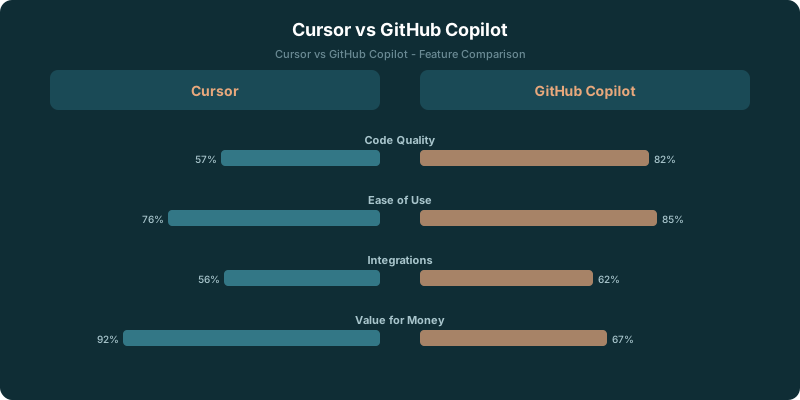
Choose Cursor if: You're building AI applications, need multi-file editing, or want access to Claude alongside GPT-4. Cursor's Composer feature saves hours on complex refactoring.
Choose GitHub Copilot if: You need enterprise approval, use JetBrains IDEs, or prioritize autocomplete speed over advanced features. It's the safe, solid choice that works everywhere.
Feature Comparison
| Feature | Cursor | GitHub Copilot |
|---|---|---|
| Multi-File Editing | ✓ Composer feature | ✗ Single file only |
| Autocomplete Quality | Excellent | Excellent+ |
| Codebase Chat | Full codebase indexed | Limited context |
| AI Models | Claude + GPT-4 | OpenAI only |
| IDE Support | VS Code only | VS Code, JetBrains, Neovim+ |
| Enterprise Ready | Growing | Mature |
| Price (Individual) | $20/month | $10/month |
| Free Tier | Limited | 30-day trial |
| Student Discount | No | Free |
Deep Dive: Where Each Tool Wins
🏆 Cursor Wins: Complex AI Development
If you're building LLM applications (LangChain, prompt engineering, RAG systems), Cursor is the clear winner. The Composer feature lets you describe a change in natural language and apply it across multiple files simultaneously.
Example: "Add error handling to all API endpoints and create corresponding tests" generates a diff across 10+ files. This is impossible with Copilot.
The ability to choose between Claude and GPT-4 also matters for AI work. Claude tends to be better at complex reasoning and longer contexts, which is exactly what you need when debugging agent behaviors or prompt chains.
🏆 Copilot Wins: Enterprise & IDE Flexibility
GitHub Copilot is the tool that IT departments have approved. If you're at a Fortune 500, there's a good chance Copilot is already available. Getting Cursor approved could take months.
The multi-IDE support is also significant. If your team uses a mix of VS Code and JetBrains, Copilot is the only option that works for everyone. Cursor is VS Code only.
And honestly, for pure autocomplete (finishing lines, writing boilerplate), Copilot is marginally faster and more polished. It's had years more training data and refinement.
Use Case Recommendations
⚡ Use Cursor For:
- → Building AI/ML applications
- → Multi-file refactoring
- → Solo developers / indie hackers
- → Teams that standardize on VS Code
- → When you need Claude for reasoning
- → Complex prompt engineering work
🤖 Use Copilot For:
- → Enterprise environments
- → JetBrains IDE users
- → Teams with mixed editors
- → Students (it's free)
- → Maximum autocomplete speed
- → GitHub-heavy workflows
Pricing Breakdown
| Tier | Cursor | GitHub Copilot |
|---|---|---|
| Free / Trial | Limited free tier | 30-day free trial |
| Individual | $20/month | $10/month ($100/yr) |
| Business | $40/month | $19/month |
| Enterprise | Contact sales | $39/month |
Cursor is 2x the price of Copilot for individuals. The question is whether multi-file editing and Claude access are worth the premium. For AI developers doing serious prompt engineering work, the answer is usually yes.
GitHub Copilot Price vs VS Code (and the 2026 Tier Map)
VS Code itself is free and open source. GitHub Copilot is a paid extension that you install on top of VS Code (or JetBrains, or Neovim). The question "GitHub Copilot price vs Code" almost always means "what does the Copilot add-on cost on top of free VS Code." The full 2026 price map looks like this:
- Copilot Free: $0/month. 2,000 completions per month and 50 chat messages. Available to any GitHub user with a verified email. Works in VS Code, Visual Studio, and JetBrains.
- Copilot Pro: $10/month or $100/year (billed annually). Unlimited completions and chat. Premium models (GPT-4.1 and Claude 3.5 Sonnet) up to a monthly request cap. Free for verified students, teachers, and maintainers of popular open-source projects.
- Copilot Pro+: $39/month or $390/year (billed annually). Adds higher premium-model quotas, longer context windows, and access to Copilot Workspace agentic features. Released in late 2025.
- Copilot Business: $19/user/month. Includes Copilot Pro features plus license management, policy controls, and IP indemnity for businesses. Required for companies that want to deploy Copilot company-wide.
- Copilot Enterprise: $39/user/month. Adds GitHub.com chat with private repos as context, fine-tuned models, audit logs, and integration with Copilot Workspace at the org level.
Two pricing details worth knowing in 2026. First, premium-model "overage" is now metered. If you blow past the included premium request quota on Pro, Business, or Enterprise, you pay $0.04 per extra premium request. Many heavy users hit this around the $10-$20 in overages range each month. Second, the Pro and Pro+ tiers were the headline 2026 pricing change: Pro+ was introduced in late 2025 at $39/month, which is the same number as Enterprise, but Pro+ is for individuals and Enterprise is for org-licensed seats.
For a deeper breakdown of plans, included models, and overage math, see our standalone GitHub Copilot pricing breakdown.
Copilot Price vs Cursor Price (Side by Side)
At individual prices, Copilot Pro is $10/month and Cursor Pro is $20/month. Copilot Pro+ at $39/month is roughly comparable to Cursor Business ($40/user/month) in price, though the two target different audiences (Pro+ is individual; Business is team-licensed). Copilot Business at $19/user/month sits between Cursor Pro and Cursor Business. The 2026 rule of thumb: Copilot is cheaper on the entry tiers; Cursor is cheaper at the top once you account for premium-model overage on Copilot.
Our Recommendation
For AI Professionals: Start with Cursor. The multi-file editing and Claude access will save you hours of manual work. If your company won't approve it, use Copilot at work and Cursor for personal projects.
For General Developers: GitHub Copilot is the safer choice. It's cheaper, works in any editor, and the autocomplete is excellent. You won't feel like you're missing much unless you're doing complex refactoring.
Run Both Side by Side: Nothing stops you from using both. Some developers use Copilot for autocomplete and switch to Cursor when they need Composer for a big refactor. At $30/month combined, it's still cheaper than many other dev tools.