What is pgvector?
pgvector is an open-source extension for PostgreSQL that adds vector similarity search. Install it, create a column with the vector type, add an index, and query using distance operators. Your embedding vectors live in the same database as your application data, queryable with standard SQL.
It's not a separate database. It's not a new service. It's PostgreSQL with vector superpowers. For the millions of applications already running on Postgres, that's the simplest possible path to vector search.
How It Works
You store vectors in a column of type vector(1536) (where 1536 is your embedding dimension). Then you query with distance operators: <-> for L2 distance, <=> for cosine distance, <#> for inner product. It's SQL. If you know SQL, you know how to use pgvector.
CREATE TABLE documents (id serial, content text, embedding vector(1536));
CREATE INDEX ON documents USING hnsw (embedding vector_cosine_ops);
SELECT id, content FROM documents ORDER BY embedding <=> '[0.1, 0.2, ...]' LIMIT 10;
Three lines. You now have a vector database.
Index Types
HNSW (Hierarchical Navigable Small World)
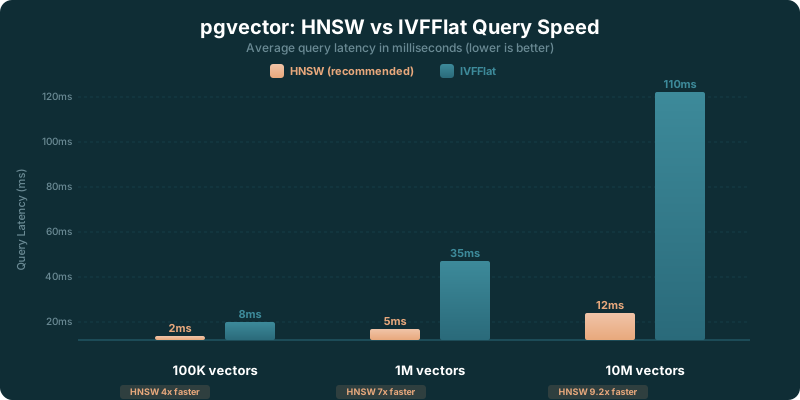
HNSW is the recommended index type for most use cases. It builds a multi-layer graph structure that enables fast approximate nearest neighbor search. Query performance is excellent, typically single-digit milliseconds for moderate-sized datasets. The tradeoff is build time and memory usage. HNSW indexes take longer to create and use more memory than IVFFlat.
Key parameters: m (connections per layer, default 16) and ef_construction (build quality, default 64). Higher values improve recall at the cost of build time and memory. For most applications, the defaults work well.
IVFFlat (Inverted File Index)
IVFFlat divides your vectors into clusters (lists) and searches only the closest clusters at query time. It builds faster than HNSW and uses less memory, but query performance isn't as good. The key parameter is lists, which controls how many clusters to create. A common rule of thumb: use sqrt(n) lists for n vectors.
IVFFlat requires data to be present before building the index (it needs to learn cluster centers). HNSW can be built on an empty table. For datasets that are loaded once and queried often, IVFFlat is a reasonable choice. For data that changes frequently, HNSW adapts better.
Iterative Scans (v0.8+)
Version 0.8 added iterative index scans, which address a long-standing pain point: filtered vector search. Previously, if you combined a vector similarity search with a WHERE clause, the index might not return enough matching results. Iterative scans keep searching the index until enough filtered results are found, preventing the "overfiltering" problem.
The SQL Advantage
pgvector's biggest strength isn't performance. It's integration. Your vectors live next to your application data. Need the 10 most similar products that are in stock and under $50? That's one SQL query with pgvector. With a separate vector database, you'd query for similar vectors, get IDs back, then query your application database for the matching products. Two roundtrips, two services, more code, more failure modes.
This advantage compounds in applications where vector search is one feature among many. E-commerce search, content recommendations, user matching: these all involve combining vector similarity with business logic filters on relational data.
Cloud Availability
You don't have to install pgvector yourself. AWS RDS for PostgreSQL, Google Cloud SQL, Azure Database for PostgreSQL, Supabase, and Neon all support pgvector. If you're using any of these platforms, enabling pgvector is a one-line command: CREATE EXTENSION vector;. Supabase and Neon have made pgvector a core part of their AI story, with documentation and tutorials specifically for RAG and semantic search use cases.
What Changed in pgvector in 2026
Version 0.8 brought the biggest quality-of-life improvement in pgvector's history: iterative scan fixes for filtered queries. Before this, combining a vector similarity search with a WHERE clause was a gamble. The index might return results that didn't match your filter, leaving you with fewer rows than expected. Iterative scans fixed that by continuing to search until enough filtered results come back.
HNSW index building got faster with parallel build support. If you're indexing a million vectors, build times dropped by 30-50% on multi-core machines. That matters when you're reindexing in production.
Managed Postgres providers doubled down on pgvector. Supabase, Neon, and even AWS RDS now treat vector search as a headline feature rather than a niche extension. Documentation, tutorials, and optimized configurations ship out of the box. You don't need to be a Postgres expert to get started.
Quantization support landed for reduced storage. Half-precision vectors (halfvec) cut storage requirements roughly in half with minimal recall loss. For large datasets where storage costs matter, this is significant. The ecosystem around pgvector is also growing, with extensions like pgvectorscale offering additional scaling options.
pgvector updates to watch in 2026
If you searched "pgvector updates 2026" you are probably trying to decide whether anything new changes the build-vs-buy math against a dedicated vector database. The honest read is that the headline features (iterative scans for filtered queries, parallel HNSW builds, and halfvec quantization) are the durable wins, and most 2026 activity is incremental hardening on top of them rather than a single dramatic release.
Three threads are worth tracking through the year. First, the managed providers keep shipping pgvector improvements faster than the upstream extension itself. Supabase, Neon, and AWS RDS roll out tuned defaults, newer pgvector point releases, and companion tooling on their own cadence, so the version you get often depends on your host more than on the pgvector release notes. Second, the pgvectorscale extension continues to push the ceiling on how far Postgres can scale vector search, which narrows the gap with purpose-built engines. Third, quantization and storage work keeps maturing, which matters most for teams holding tens of millions of vectors where storage cost, not query speed, is the binding constraint.
Because point releases and provider rollouts move independently, treat any specific version number as a snapshot. As of 2026, confirm the current pgvector release and what your managed provider actually runs on the official pgvector releases page and your host's changelog before you plan an upgrade around a feature.
Why pgvector Wins for Most Teams
If you already run Postgres, pgvector is the obvious choice. Not the exciting choice, not the trendy choice. The obvious one. Zero new infrastructure. Zero new vendor contracts. Zero new billing dashboards. Zero new monitoring tools. You install an extension and write SQL.
SQL is the advantage everyone underestimates. You can join vector search results with your users table, your products table, your orders table. All in one query. Need the 10 most similar products that are in stock, under $50, and available in the user's region? That's one SQL query with pgvector. With Pinecone, that's two services, two roundtrips, and glue code to stitch the results together.
Performance is good enough for most use cases. Under 5 million vectors, HNSW queries return in single-digit milliseconds. That covers 90% of RAG applications, recommendation engines, and semantic search features. You don't need a Ferrari for a trip to the grocery store.
The only reasons to pick Pinecone or Weaviate over pgvector: you need more than 10 million vectors, you need managed scaling beyond what your Postgres provider offers, you need built-in hybrid search, or you don't run Postgres at all. If none of those apply, pgvector is the right call.
pgvector Performance Tips
pgvector works well out of the box, but a few configuration choices make a real difference at scale.
Use HNSW indexes for queries under 5 million vectors. HNSW is faster than IVFFlat for most read-heavy workloads, handles updates gracefully, and doesn't require data to be present before building the index. It's the right default.
Set m=16 and ef_construction=64 for a balanced speed/recall tradeoff. Increasing m to 32 or ef_construction to 128 improves recall slightly but doubles build time and memory usage. Only tune these if you've measured recall and found it lacking.
Use halfvec to cut storage in half. Half-precision vectors use 2 bytes per dimension instead of 4. For 1536-dimension vectors, that's 3KB per vector instead of 6KB. Over a million vectors, you save roughly 3GB of storage with minimal impact on search quality.
Run VACUUM and ANALYZE after bulk inserts. Postgres doesn't automatically update table statistics after large data loads. Without fresh statistics, the query planner makes bad decisions about index usage. A quick VACUUM ANALYZE your_table; after a bulk insert keeps performance consistent.
Set maintenance_work_mem to at least 1GB for large index builds. HNSW index creation is memory-intensive. The default maintenance_work_mem is usually 64MB or 256MB, which forces the index build to spill to disk. For collections over 1 million vectors, bumping this to 1-2GB during the index build dramatically reduces build times. Reset it afterward if memory is tight.
pgvector vs Pinecone
Pinecone is faster at scale and requires zero infrastructure management. pgvector is free and lives in your existing database. If vector search is your primary workload, Pinecone is the better choice. If vector search is one feature in a larger application that already uses PostgreSQL, pgvector avoids the complexity of a second database.
pgvector vs Weaviate
Weaviate offers hybrid search, built-in vectorization, and multi-tenancy features that pgvector doesn't have. But Weaviate is a separate service to deploy and manage. pgvector adds vector search to what you already run. The choice usually comes down to whether you need Weaviate's advanced features or prefer the simplicity of staying within PostgreSQL.
✓ Pros
- No new infrastructure: adds vector search to your existing PostgreSQL database
- Full SQL support means you can join vector results with relational data in one query
- HNSW indexes provide fast approximate nearest neighbor search
- Available on major cloud platforms (AWS RDS, Supabase, Neon, GCP Cloud SQL)
- Free and open source with a permissive license
✗ Cons
- Performance doesn't match dedicated vector databases at very large scale
- Tuning HNSW and IVFFlat indexes requires understanding the tradeoffs
- No built-in vectorization, you need to generate embeddings yourself
- Filtering with vector search can be slow without careful index planning
Who Should Use pgvector?
Ideal For:
- Teams already running PostgreSQL who want vector search without adding a new database to their stack
- Projects that need to join vector and relational data where a single SQL query beats cross-service calls
- Small to medium AI features within existing applications where a dedicated vector database is overkill
- Developers on platforms like Supabase or Neon where pgvector is pre-installed and ready to use
Maybe Not For:
- Large-scale vector search (100M+ vectors) where dedicated databases like Pinecone or Weaviate handle the load more efficiently
- Teams without PostgreSQL expertise since tuning indexes and queries requires database knowledge
- Projects needing hybrid or semantic search features that dedicated vector databases provide out of the box
Our Verdict
pgvector is the most practical choice for teams that already run PostgreSQL. And a lot of teams run PostgreSQL. Instead of adding Pinecone or Weaviate to your stack (with new SDKs, new billing, new monitoring, new failure modes), you install an extension and write SQL. Your embeddings live next to your application data. You can join vector search results with user tables, product tables, or anything else in a single query. That's powerful.
The limits are real, though. pgvector isn't as fast as dedicated vector databases for large-scale workloads. Index tuning requires understanding HNSW parameters like ef_construction and m, or IVFFlat's lists parameter. Filtered vector search can be slow without the iterative scan features in v0.8+. For under 10 million vectors with moderate query volume, pgvector is often the right call. Beyond that, or if vector search is your primary workload rather than a feature within a larger app, a dedicated solution makes more sense.