What is Pinecone?
Pinecone is a fully managed vector database designed for AI applications. You store embedding vectors alongside metadata, and Pinecone handles similarity search at scale. It's the most popular managed vector database in the AI ecosystem, used by thousands of companies for RAG, recommendation systems, semantic search, and anomaly detection.
The key word is "managed." Pinecone runs entirely in the cloud. You don't install anything, you don't manage servers, you don't tune indexes. That's the product.
Key Features
Serverless Architecture
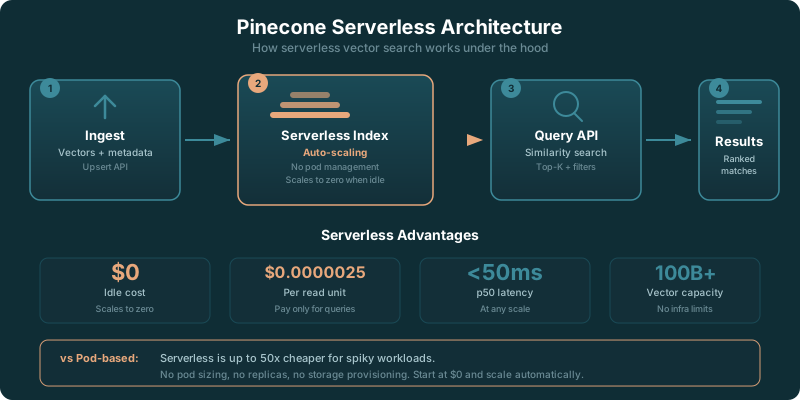
Pinecone's serverless option, introduced in early 2024, is now the default. You create a serverless index, and Pinecone handles all the scaling automatically. You pay for storage ($0.33/GB/month) and operations (read and write units). There's no capacity planning. If your traffic spikes, Pinecone scales up. If it drops, you stop paying for the extra compute.
This is a big deal for teams that don't want to guess how much infrastructure they'll need. Pod-based indexes (the older approach with pre-provisioned capacity) are still available for workloads that need predictable performance.
Namespaces and Metadata Filtering
Namespaces let you partition data within a single index. Each namespace acts like a separate collection, so you can segment by customer, environment, or data type without creating multiple indexes. Metadata filtering lets you attach key-value pairs to vectors and filter on them during queries. Search for similar vectors where category = "electronics" and price < 100. This combination of vector similarity and structured filtering covers most production use cases.
Integrations
Pinecone integrates with everything. LangChain, LlamaIndex, Haystack, Semantic Kernel, Vercel AI SDK. If you're building an AI application with a popular framework, there's a Pinecone integration ready to go. The Python and Node.js clients are well-maintained and the documentation is clear.
Performance at Scale
Pinecone handles billions of vectors with single-digit millisecond query latency. For most applications, query performance isn't the bottleneck. The architecture is optimized for high-throughput reads, which is the typical access pattern for RAG and search applications.
Pinecone as a Managed Vector Database Service
Pinecone is the largest managed (fully hosted, single-tenant or serverless) vector database service in production as of 2026. "Managed" here has a specific meaning: Pinecone runs the database, the index, the API, the storage, and the upgrade path. You never touch a server, you never run a Helm chart, you never tune HNSW parameters. You write to an HTTP API and query the same API. The control plane is Pinecone's. The data plane is Pinecone's. Your code only sees vectors going in and search results coming out.
What that buys you in practice:
- Auto-scaling. Serverless indexes scale read and write capacity automatically. There is no node count to configure. Spike traffic is absorbed without an autoscaling policy on your side.
- Multi-region replication. The Enterprise plan provides multi-region indexes with consistent reads. You pick the AWS, GCP, or Azure regions; Pinecone handles replication, failover, and consistency.
- Zero-downtime upgrades. Pinecone rolls index engine upgrades behind the API. You do not schedule maintenance windows. You do not lose vectors during a version bump.
- SOC 2 Type II, HIPAA, and GDPR. Pinecone Enterprise is certified for SOC 2 Type II and supports HIPAA Business Associate Agreements. EU customers can pin storage to the eu-west-1 region.
- SLAs and 24x7 support. Enterprise tier ships a 99.95 percent uptime SLA and round-the-clock support. Standard tier ships best-effort uptime with business-hours support.
- Pinecone Inference API. Built-in embedding generation from text input, eliminating one round trip to OpenAI or Cohere for new vectors. This is a 2026 addition that other managed vector services like Weaviate Cloud and Zilliz Cloud have matched in pieces but not as a unified flow.
Pinecone is not the only managed vector database service in 2026. Weaviate Cloud (the hosted Weaviate offering) is open-core, supports hybrid search, and runs in AWS, GCP, and Azure. Zilliz Cloud is the hosted Milvus service and ships strong support for large-scale image and multi-modal vectors. Qdrant Cloud is the hosted Qdrant service with first-class filtering. MongoDB Atlas Vector Search and AWS OpenSearch Vector add vectors on top of an existing database service rather than running a vector-first product. Pinecone wins on operational simplicity and ecosystem depth. The others win on cost at scale, hybrid search, or fit with an existing data stack.
Managed Service vs Self-Hosted Vector Databases
Choosing Pinecone (or any managed vector DB) versus self-hosted Weaviate, Milvus, Qdrant, or pgvector comes down to four questions:
1. What is your team's ops budget? If you do not already operate Postgres or Kubernetes at production scale, managed wins. The hidden cost of running a vector DB yourself is the on-call rotation, the backup pipeline, and the HNSW tuning, not the EC2 line item.
2. How predictable is your workload? Spiky traffic favors managed serverless. Steady-state high QPS favors self-hosted (you can right-size hardware once and run it for a year).
3. How sensitive is your data? Heavily regulated data (defense, healthcare in some geographies, on-premise compliance) favors self-hosted or BYOC. Pinecone Enterprise BYOC runs in your AWS, GCP, or Azure account and is the middle ground.
4. What is your cost ceiling at scale? Above roughly 50 million vectors and 1 million queries per day, self-hosted Weaviate or Milvus on right-sized hardware tends to undercut Pinecone serverless by 40 to 70 percent. Below that scale, the ops savings of managed usually beat the infra savings of self-hosted.
The honest summary in 2026: for most AI teams under 10 million vectors, Pinecone serverless is the lowest total cost of ownership once you factor in ops time. For teams above 100 million vectors with steady load, a self-hosted Milvus or Weaviate cluster on right-sized infrastructure wins on cost. Everything in between is a judgment call about how much your team values being out of the database operations business.
What Changed in Pinecone in 2026
Pinecone has gone all-in on serverless. Pod-based indexes are officially legacy, and new users won't even see them unless they go looking. Serverless is the default for every new index, and the pricing model reflects that shift: you pay for read units, write units, and storage. No more idle pod charges eating your budget overnight.
The Inference API is the other big addition. Pinecone now offers built-in embedding generation, so you don't need a separate call to OpenAI or Cohere to create vectors. Upload raw text, and Pinecone handles the embedding step. It's one less service to manage and one fewer API key to rotate.
Metadata filtering got faster. Queries that combine vector similarity with WHERE-style filters now perform better on large indexes, especially when the filter is selective. BYOC (bring your own cloud) is available at the Enterprise tier for teams that need data residency or compliance controls. And pricing across the board is simpler to reason about than the old pod-based model.
Setting Up Pinecone for RAG: A Quick Walkthrough
Getting a RAG application running on Pinecone takes about 15 minutes. Here's what matters.
Start by creating a serverless index with the right dimensions. If you're using OpenAI's text-embedding-3-small, set dimensions to 1536. For text-embedding-3-large, it's 3072. Mismatched dimensions will silently produce garbage results, so get this right the first time.
Chunk your documents into 200-500 token pieces. Smaller chunks give more precise retrieval for Q&A. Larger chunks preserve more context but return fuzzier matches. There's no universal answer here, but 300 tokens is a safe starting point for most knowledge base applications.
Use namespaces to separate environments. A single Pinecone index can hold dev, staging, and production data in different namespaces. This saves money compared to running three separate indexes, and it keeps your environment management clean.
Attach metadata to every vector: source document, date, category, author, whatever your application needs to filter on. Metadata filtering is what turns a raw similarity search into something useful. A query like "find similar documents from the last 30 days in the engineering category" is trivial with good metadata.
Set up API key rotation before you go to production. Pinecone supports multiple API keys per project. Rotate them on a schedule. Don't hardcode a single key in your application and forget about it.
Real-World Cost Scenarios
Pinecone pricing depends on three things: how much data you store, how often you read, and how often you write. Here's what real workloads look like.
Small RAG App
50,000 vectors from a company knowledge base. Around 1,000 queries per day from an internal chatbot. Storage is minimal, read units are low. Expect $5-15/month on serverless. The free Starter tier might even cover this if query volume stays modest.
Mid-Size Application
1 million vectors powering a customer-facing search feature. 10,000 queries per day with metadata filtering. This is solidly in the Standard plan territory. Budget $50-100/month depending on query complexity and filtering patterns.
Production at Scale
10 million or more vectors serving 100,000+ queries per day. This is where costs climb. Plan for $300-800/month, and potentially more if you're doing heavy writes (frequent index updates) or complex filtered queries. At this scale, it's worth comparing against self-hosted alternatives like Weaviate or pgvector to see if the ops savings justify the cost.
One thing these numbers don't include: your embedding API costs. If you're using OpenAI's embedding models, that's a separate bill. For a million documents, embedding generation alone can run $10-50 depending on the model and chunk sizes. Factor that into your total cost of ownership.
Pricing
Pinecone offers a free Starter tier, a Standard plan from $50/month, and Enterprise from $500/month. Pricing is usage-based with per-operation and storage charges that scale with your workload. See our full Pinecone pricing breakdown for real-world cost examples, hidden gotchas, and plan comparisons.
Pinecone vs Weaviate
Weaviate is the most common alternative. It's open source, supports self-hosting, and includes built-in vectorization and hybrid search. Pinecone is simpler to operate but costs more at scale and lacks self-hosting. See our Pinecone vs Weaviate comparison for the full breakdown.
Pinecone vs Chroma
Chroma is lighter weight and runs in-memory, making it perfect for development and small projects. Pinecone is the better choice when you need production reliability and scale. They serve different points on the complexity spectrum.
Pinecone vs pgvector
If you already run PostgreSQL, pgvector lets you add vector search without a new service. Pinecone offers better performance at scale and more vector-specific features, but pgvector's zero-new-infrastructure approach is hard to beat for teams with existing Postgres deployments.
Local development with Pinecone
One of the most common Pinecone questions is how to develop and test against it locally without burning a cloud index or paying for one during development. Because Pinecone is a managed service with no self-hosted version, "running Pinecone on localhost" is not the same as standing up an open-source database, and that catches a lot of people off guard.
Pinecone's own answer is Pinecone Local, an in-memory emulator that runs as a container on your machine for development and testing. It mimics the Pinecone API so your code can point at a local endpoint, create indexes, upsert vectors, and query them without touching the cloud. The catch is that it is for development only: data is in memory, so it does not persist across restarts, and it is not built for production traffic, scale, or durability. Treat it as a fast inner-loop for writing and testing integration code, then point the same client at your real cloud index for staging and production. As of 2026, confirm the current capabilities and limits of Pinecone Local on the official Pinecone documentation, since the emulator is evolving.
If you want a local-first or self-hostable vector store instead, that is a different requirement and Pinecone is the wrong tool for it. Open-source options run fully on your own infrastructure: Chroma is the lightest to run locally for prototyping, Weaviate self-hosts for production, and pgvector lives inside a Postgres you already control. Pick one of those when "no cloud dependency" is a hard requirement rather than a development convenience.
✓ Pros
- Zero infrastructure management with fully managed serverless architecture
- Free starter tier is generous enough for prototyping and small projects
- Excellent query performance at scale with low-latency vector search
- Strong metadata filtering for combining vector search with structured queries
- Deep integrations with LangChain, LlamaIndex, and every major AI framework
✗ Cons
- No self-hosting option means vendor lock-in (BYOC only at enterprise tier)
- Costs can grow quickly at scale, with $50/month minimum on Standard
- Closed source, so you can't inspect or modify the database engine
- Limited query capabilities compared to databases with hybrid search built-in
Who Should Use Pinecone?
Ideal For:
- Teams that don't want to manage database infrastructure where Pinecone's fully managed approach saves real ops time
- Production RAG applications that need reliable, low-latency vector search at scale
- Startups and mid-size teams where the free tier gets you started and scaling is automatic
- Projects using LangChain or LlamaIndex where Pinecone is a first-class integration
Maybe Not For:
- Teams that need to self-host since Pinecone is cloud-only (no on-premise deployment)
- Budget-constrained projects at scale because costs grow with data volume and query frequency
- Teams that want hybrid search out of the box where Weaviate's built-in BM25 + vector search is stronger
- Open-source advocates who need to audit or modify the database code
Our Verdict
Pinecone is the easiest way to add vector search to your AI application. Period. The serverless architecture means you create an index, upload vectors, and query them. No servers to provision, no clusters to tune, no rebalancing to worry about. For teams that want to build AI features instead of managing infrastructure, that's a compelling pitch.
In April 2026, Pinecone has fully committed to serverless as the default. Pod-based indexes are legacy. The pricing is simpler (read units, write units, storage) and there is no idle compute charge. For bursty RAG workloads that go quiet overnight, serverless saves 40-60% over the old pod model. The cost question is still real at scale: production workloads on Standard start at $50/month and grow with usage. At scale, self-hosted alternatives like Weaviate or pgvector can be significantly cheaper. Pinecone wins on simplicity and ops overhead. It doesn't always win on cost or features.