 PE Collective
Best AI Code Editors (2026)
AI-native editors that write, refactor, and debug alongside you. Not plugins, full IDEs.
Last updated: April 2026
AI code editors are full development environments built around AI from the ground up. Unlike AI coding assistants that bolt onto existing editors, these IDEs integrate AI into every workflow: autocomplete, multi-file editing, terminal commands, codebase search, and debugging.
The market has consolidated around a few serious contenders. Cursor and Windsurf forked VS Code and rebuilt the AI layer. Replit went cloud-native with an AI agent that deploys for you. Zed is betting on performance-first with AI as an accelerant. And VS Code with GitHub Copilot remains the default for most developers.
We tested all five on real production codebases. TypeScript monorepos, Python data pipelines, and React applications. Here is how they compare on the things that actually matter.
Key Takeaways
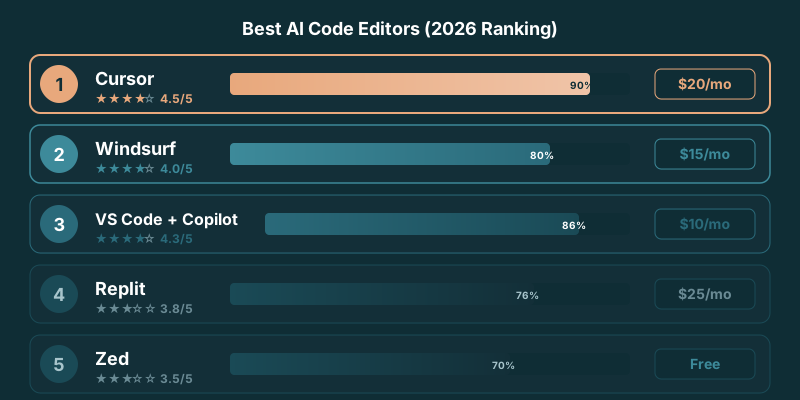
- Cursor is the best AI code editor in 2026 for most developers: strongest autocomplete, best multi-file editing, VS Code extension support.
- Windsurf is the closest rival, with a cleaner agent flow that some teams prefer for larger refactors.
- VS Code with GitHub Copilot remains the cheapest serious option and the safe default if you already live in VS Code.
- Replit is the pick when you want a cloud IDE that builds and deploys for you with no local setup.
- An AI code editor is a full IDE rebuilt around AI; an AI coding assistant is a plugin added to an existing editor.
Our Top Picks
Detailed Reviews
Cursor
Best OverallThe most complete AI code editor. Tab completions are the best in class, Composer handles multi-file edits reliably, and Cmd+K inline editing feels natural. Built on VS Code so your extensions work. Agent mode can implement features across 10+ files.
Windsurf
Best ValueCascade is Windsurf’s killer feature, an AI agent that reads your codebase, plans changes, and executes across files. The autocomplete is solid but not Cursor-level. At $15/mo versus Cursor’s $20, it’s the value pick.
VS Code + GitHub Copilot
Most FamiliarThe default choice for most teams. Copilot’s autocomplete is reliable, chat works well for explanations, and the VS Code ecosystem is unmatched. Agent mode (Copilot Workspace) is catching up but still behind Cursor and Windsurf.
Replit
Best for PrototypingCloud-based editor with an AI agent that can build and deploy full applications from a prompt. Best for rapid prototyping and learning. The browser-based environment means you can code from anywhere.
Zed
Best PerformanceThe fastest code editor available, written in Rust. AI features are newer and less mature than Cursor or Copilot, but the editing experience is exceptional. Supports Claude, GPT, and local models through a unified AI interface.
Is Cursor still the best AI code editor in 2026?
Short answer: for most developers, yes. Cursor held the top spot through the 2026 update because it kept the lead on the two things that decide daily productivity, autocomplete that predicts the right next edit and a Composer flow that edits several files at once without losing the plot. It also inherits the full VS Code extension marketplace, so switching costs almost nothing if you already run VS Code.
The gap narrowed, though. Windsurf's agent has matured into a genuine alternative, and some teams now prefer it for large, multi-step refactors where they want the editor to drive. GitHub Copilot inside VS Code keeps closing the feature gap and stays the value pick at the lowest paid tier. If you searched "best AI code editor 2026" hoping for a single name, the honest answer is Cursor first, Windsurf as the strong second, and Copilot if budget or an existing VS Code setup is the deciding factor. Prices and free-tier limits move often, so confirm the current plan on each tool's own pricing page before you commit. For the head-to-head detail, see Cursor vs Windsurf and Cursor vs Copilot.
How We Tested
We evaluated each editor on five dimensions: AI autocomplete quality across 200 completions, multi-file editing accuracy, codebase understanding (can the AI find and modify the right files?), speed and responsiveness, and pricing value. Testing was done on a MacBook Pro M3 with repos ranging from 10K to 500K lines of code.
Frequently Asked Questions
What is the best AI code editor in 2026?
Cursor is the best overall. It has the strongest autocomplete, best multi-file editing (Composer), and inherits VS Code’s extension ecosystem.
Is Cursor better than VS Code with Copilot?
For AI features, yes. Cursor’s tab completions, Composer, and agent mode outperform Copilot in our testing. But VS Code has a larger ecosystem and Copilot is more affordable at $10/mo.
Are AI code editors worth paying for?
If you write code daily, yes. The productivity gains from AI autocomplete and multi-file editing typically save 1-2 hours per day, easily justifying $15-40/mo.
Can I use my VS Code extensions in Cursor?
Yes. Cursor is built on VS Code and supports the same extension marketplace. Most extensions work without modification.
What’s the difference between an AI code editor and an AI coding assistant?
AI coding assistants like Copilot are plugins that add AI features to existing editors. AI code editors like Cursor and Windsurf are full IDEs rebuilt around AI, with deeper integration into every workflow.
Which AI code editor should I use in 2026?
Start with Cursor unless you have a specific reason not to. It leads on autocomplete and multi-file editing and supports VS Code extensions. Pick Windsurf if you prefer its agent flow for big refactors, or stay on VS Code with GitHub Copilot if you want the cheapest serious option and already use VS Code. Replit is the choice for a cloud IDE that deploys for you.
Is Cursor the best AI code editor in 2026?
For most developers, yes. Cursor kept the top spot through 2026 on autocomplete quality and Composer-style multi-file editing, plus VS Code extension support. Windsurf is the closest rival and Copilot is the value pick, but Cursor remains the default recommendation for daily coding.
Sources
- Cursor (official)
- Windsurf (official)
- GitHub Copilot (official)